
 Jane
Jane

Unboxing AirPods Pro is just the beginning. Beyond delivering high-quality music and podcasts, these earbuds are packed with smart features that enhance comfort, convenience, and overall usability. Exploring and optimizing these capabilities transforms every listening session into a personalized experience.
AirPods Pro Tips to Unlock Full Audio & Smart Features
AirPods Pro Fit Test
The AirPods Pro come with multiple ear tip sizes to ensure a secure and comfortable fit for every ear shape. Achieving the correct fit is crucial, not just for comfort, but also for unlocking the full potential of features like Active Noise Cancellation, Transparency Mode, and microphone clarity during calls. A poor fit can reduce noise-cancelling effectiveness, compromise audio quality, and cause discomfort during extended wear.
To find the ideal fit, the AirPods Pro include an Ear Tip Fit Test accessible through the Settings app. With the earbuds in place and connected, selecting this feature initiates a brief audio test. The earbuds play a series of tones and measure the sound detected inside the ear. Based on the results, the test determines whether the current ear tips provide a proper seal or recommends trying a different size. This ensures that each listener experiences the most effective noise cancellation and optimal audio performance.
The AirPods Pro 3 expands the customization options with five interchangeable ear tip sizes, allowing precise adjustment for all-day comfort. Swapping tips is simple and secure, enabling a tailored fit for virtually any ear shape. Whether wearing the AirPods during workouts, long commutes, or extended listening sessions, a proper fit enhances stability, prevents ear fatigue, and keeps the earbuds in place without constant adjustment.
Overall, the fit test is a quick yet essential step to maximize the AirPods Pro experience. It guarantees not only better sound quality and noise management but also long-lasting comfort, letting users enjoy music, calls, and podcasts with confidence.
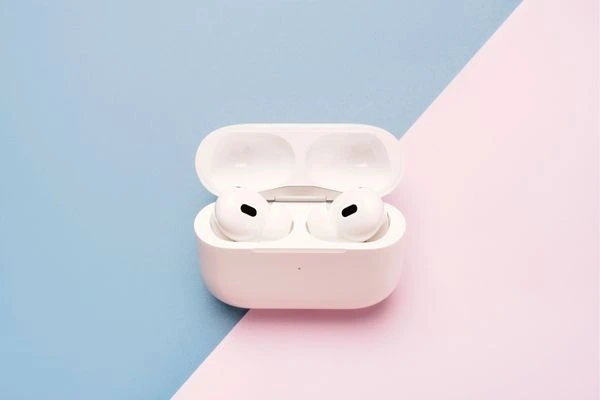
AirPods Pro Listening Modes
AirPods Pro offer versatile listening modes tailored to different environments:
- Active Noise Cancellation: External microphones detect surrounding sounds and counteract them with anti-noise, while internal microphones monitor sound inside the ear, delivering immersive noise reduction.
- Transparency Mode: Lets external sounds in, keeping awareness of surroundings for safety or casual conversation.
- Adaptive Audio: Automatically adjusts noise cancellation according to the environment, providing a seamless audio experience.
iOS 18 and newer versions allow further customization of Adaptive Audio to let in more or less ambient noise. Switching between modes can be done via the force sensor on the stem, the Settings app, or by using Control Center and holding the volume slider.
Conversation Awareness
The AirPods Pro include multiple ear tip sizes to provide a secure and comfortable fit for every ear shape. Getting the right fit is essential not only for comfort but also for making the most of features like Active Noise Cancellation, Transparency Mode, and clear microphone performance during calls. An improper fit can reduce noise-cancelling effectiveness, affect audio quality, and cause discomfort over long listening sessions.
To achieve the optimal fit, the AirPods Pro offer an Ear Tip Fit Test available in the Settings app. Once the earbuds are in place and connected, this test plays a series of tones and measures the sound inside the ear. Based on the results, it identifies whether the current ear tips create a proper seal or suggests trying a different size, ensuring maximum noise cancellation and superior sound performance.
The AirPods Pro 3 further enhance customization with five interchangeable ear tip sizes, allowing a precise, all-day fit. Switching tips is quick and secure, and they adapt to virtually any ear shape. Whether for workouts, commuting, or long listening sessions, the right fit improves stability, reduces ear fatigue, and keeps the earbuds comfortably in place.
Ultimately, the fit test is a simple yet vital step for optimizing the AirPods Pro experience. It ensures the best sound quality, effective noise management, and long-lasting comfort, letting music, podcasts, and calls be enjoyed with confidence.

AirPods Pro Controls
The Force Sensor on AirPods Pro stems offers multiple intuitive controls without touching the iPhone:
- Single press: Play or pause audio
- Double-press: Skip to the next track
- Triple press: Return to the previous track
- Press: Answer incoming calls
- Swipe up or down: Adjust volume
All Force Sensor functions are customizable in the AirPods menu of the Settings app, allowing you to personalize how these gestures work.
Head Gestures
AirPods Pro also support head gesture controls for hands-free interaction:
- Nod head: Accept calls or reply to notifications
- Shake head: Decline calls or dismiss notifications
These gestures can be configured in the AirPods menu under Settings, offering an alternative way to manage calls and alerts without touching the earbuds.
Hearing Test and Hearing Aid Features
AirPods Pro now integrate advanced hearing health tools, expanding their functionality beyond standard audio use. A built-in hearing test lets users assess their hearing and identify potential hearing loss. This quick and convenient test uses the earbuds to deliver precise audio tones and measures how each ear responds, providing insights into hearing health that can be easily monitored over time.
For users with mild to moderate hearing loss, AirPods Pro can also function as a hearing aid. When enabled, the earbuds enhance speech clarity and reduce background noise, making phone calls, video chats, and everyday listening more comfortable and accessible. This feature provides tailored audio amplification without the need for additional devices, blending seamlessly into daily routines. By combining hearing support with high-quality sound and noise management, AirPods Pro ensure both audio enjoyment and improved hearing assistance in one sleek, wearable device.

Microphone Modes
AirPods Pro feature several microphone modes for different listening and recording scenarios:
- Automatic: Selects the best mode for calls or recordings
- Standard: Uses standard voice processing
- Voice Isolation: Focuses on the speaker’s voice while blocking background noise
- Broad Spectrum: Captures all ambient sounds
These modes are accessible during calls or recordings via Control Center, ensuring optimal audio capture for every situation.
Find My Integration
AirPods Pro work seamlessly with Apple’s Find My app, providing a simple and effective way to locate misplaced earbuds or the charging case. The app displays the precise location of the AirPods on a map, making it easy to track them down, whether they are lost at home, in the office, or on the go. For added convenience, a sound can be played directly from the earbuds, helping users pinpoint their location even in cluttered spaces.
Additionally, Find My allows users to set notifications if the AirPods Pro are left behind, ensuring the earbuds are not accidentally left behind during travel, work, or daily activities. This integration provides peace of mind, particularly for frequent travellers, commuters, or anyone who relies on their AirPods for daily use. With these features, losing track of the earbuds becomes far less stressful, and the overall user experience is enhanced through practical, proactive solutions.
Recommended Accessories for AirPods Pro
Enhancing the AirPods Pro experience goes beyond the earbuds themselves. Carefully selected accessories can boost convenience, protect the device, and even add a touch of style. These accessories make everyday use more practical and enjoyable.
Spigen AirPods Pro Lanyard
The Spigen AirPods Pro lanyard is perfect for active lifestyles. It secures the earbuds around the neck, reducing the risk of accidental drops or loss during workouts, commuting, or outdoor activities. Lightweight and flexible, it allows easy movement without compromising comfort, making it ideal for users who are constantly on the go.
Native Union Leather Case
A premium leather case from Native Union adds both style and protection to the AirPods Pro. The soft, durable leather not only safeguards the charging case from scratches and bumps but also gives it a sophisticated, modern look. Available in a range of colours, it’s a perfect blend of fashion and functionality, turning the AirPods case into a stylish accessory.
Belkin MagSafe Charger, 3-in-1 Wireless Charging Stand
The Belkin 3-in-1 MagSafe wireless charging stand is designed for convenience. It allows simultaneous charging of AirPods Pro, iPhone, and Apple Watch in a single, organized space. The magnetic alignment ensures devices stay securely in place, while the vertical and horizontal charging options make it versatile for bedside tables, desks, or living rooms.

Twelve South HiRise 3 Deluxe
The Twelve South HiRise 3 Deluxe offers an elevated charging solution that combines functionality with aesthetics. Its sleek design organizes the AirPods Pro, iPhone, and Apple Watch in one tidy station. Adjustable height and elevated placement make it easy to access devices while keeping cables neatly out of the way. This accessory is handy for keeping a workspace or nightstand clutter-free.
By investing in these accessories, the AirPods Pro experience becomes safer, more organized, and visually appealing. They not only extend the lifespan of the earbuds but also enhance usability, making it easier to enjoy music, calls, and media wherever you go.
Audio Sharing
Audio Sharing allows two sets of AirPods or Beats headphones to listen to the same audio simultaneously. To activate, tap the AirPlay button in Now Playing, Lock Screen, or Control Center, select “Share Audio,” and bring the second set of headphones close. This feature is compatible with all AirPods generations and several Beats models, making it perfect for sharing music, podcasts, or videos with friends.
Maximizing the AirPods Pro Experience
AirPods Pro offer more than just high-quality audio, combining comfort, convenience, and advanced functionality for a seamless listening experience. Customizable ear tips, versatile listening modes, integrated hearing tools, multiple microphone options, and Find My tracking enhance usability and personalize audio enjoyment. Use with compatible accessories or share audio between devices to expand versatility. These features work together to create an optimized, immersive, and engaging listening experience.